Tutorial: Fine-Tuning IndoBERTweet with PyTorch
- PyTorch
- Transformers
- Sentiment Analysis
- Indonesian NLP
Fine-tuning starts with a pretrained model and updates its parameters for a specific task. In this tutorial, we'll use IndoBERTweet to classify Indonesian text as positive, negative, or neutral.
We'll write the training loop in PyTorch and use Hugging Face Transformers for the tokenizer and model. The example is adapted from my sentiment analysis project, but you can follow it in a fresh notebook without running the project itself.
1. Prepare the environment and data
Use Python 3.11 or 3.12. These package versions follow the project environment:
pip install torch==2.7.1 transformers==4.53.1 pandas==2.3.0 scikit-learn==1.6.1
Prepare your own UTF-8 CSV named sentiment.csv with text and sentiment columns. For example:
text,sentiment
"Pelayanannya cepat dan ramah",positive
"Aplikasinya sering error",negative
"Pembaruan tersedia hari ini",neutral
These rows illustrate the format, not a sufficient training dataset. You'll need enough labeled examples of every class to split them into training, validation, and test sets.
import pandas as pd
import torch
from sklearn.model_selection import train_test_split
from sklearn.metrics import classification_report, f1_score
from torch.utils.data import Dataset, DataLoader
from transformers import (
    AutoTokenizer, AutoModelForSequenceClassification,
    DataCollatorWithPadding, set_seed,
)

set_seed(42)
label2id = {"neutral": 0, "positive": 1, "negative": 2}
id2label = {value: key for key, value in label2id.items()}

df = pd.read_csv("sentiment.csv")
assert not df[["text", "sentiment"]].isna().any().any()
df["text"] = df["text"].astype(str).str.strip()
assert df["text"].ne("").all()
assert df["sentiment"].isin(label2id).all()
assert df.groupby("text")["sentiment"].nunique().le(1).all()
df = df.drop_duplicates("text").reset_index(drop=True)
df["label"] = df["sentiment"].map(label2id)

train_val, test = train_test_split(
    df, test_size=0.2, stratify=df["label"], random_state=42,
)
train, val = train_test_split(
    train_val, test_size=0.25,
    stratify=train_val["label"], random_state=42,
)
This gives us a stratified 60/20/20 split. Remove duplicate texts before splitting so identical examples do not land in different partitions. If your data contains repeated users, conversations, or near-duplicates, inspect those overlaps too.
2. Turn text into batches
The tokenizer converts text into token IDs and attention masks. Use the tokenizer that belongs to the checkpoint.
checkpoint = "indolem/indobertweet-base-uncased"
tokenizer = AutoTokenizer.from_pretrained(checkpoint)

class SentimentDataset(Dataset):
    def __init__(self, frame):
        self.frame = frame.reset_index(drop=True)

    def __len__(self):
        return len(self.frame)

    def __getitem__(self, index):
        row = self.frame.iloc[index]
        item = tokenizer(row["text"], truncation=True, max_length=128)
        item["labels"] = int(row["label"])
        return item

collator = DataCollatorWithPadding(tokenizer=tokenizer)

def make_loader(frame, shuffle=False):
    return DataLoader(
        SentimentDataset(frame), batch_size=16,
        shuffle=shuffle, collate_fn=collator,
    )

train_loader = make_loader(train, shuffle=True)
val_loader = make_loader(val)
test_loader = make_loader(test)
The collator pads each batch to its longest sequence. We truncate sequences at 128 tokens for this example; inspect your text lengths before choosing that limit for another dataset.
3. Load the model and define evaluation
The sequence-classification model adds a prediction head to the encoder. Passing labels to its forward method also computes classification loss. Hugging Face's text classification guide explains the tokenizer and model interfaces in more detail.
device = torch.device("cuda" if torch.cuda.is_available() else "cpu")
model = AutoModelForSequenceClassification.from_pretrained(
    checkpoint, num_labels=3,
    label2id=label2id, id2label=id2label,
).to(device)
optimizer = torch.optim.AdamW(model.parameters(), lr=3e-5)

@torch.no_grad()
def predict(model, loader):
    model.eval()
    actual, predicted = [], []
    for batch in loader:
        actual.extend(batch["labels"].tolist())
        inputs = {key: value.to(device) for key, value in batch.items()}
        logits = model(**inputs).logits
        predicted.extend(logits.argmax(dim=-1).cpu().tolist())
    return actual, predicted
Evaluation uses model.eval() to change training-specific behavior such as dropout, and torch.no_grad() to avoid tracking gradients.
4. Write the training loop
For each batch, compute loss, backpropagate, and update the parameters. Evaluate after each epoch and save the checkpoint with the highest validation macro-F1.
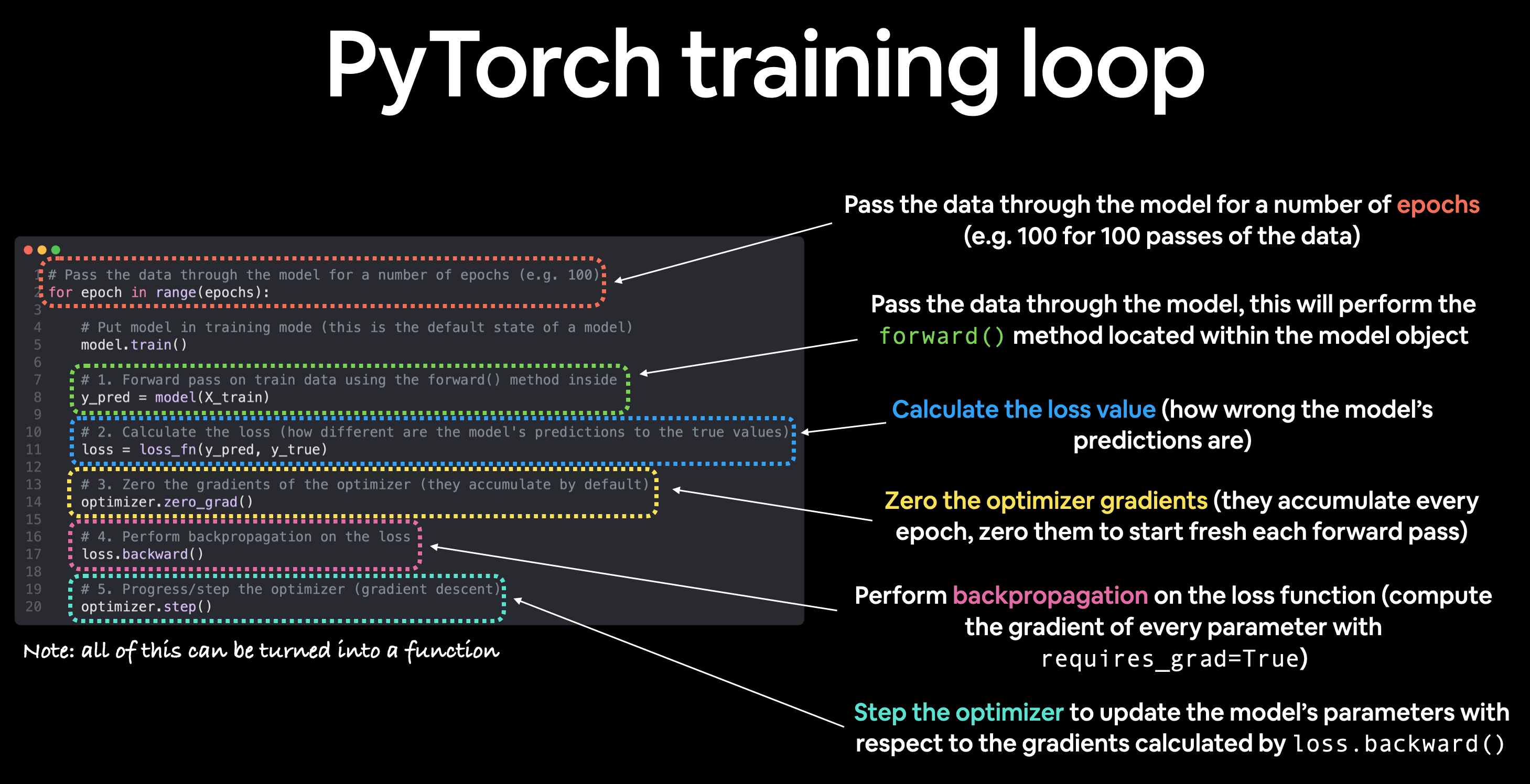
Figure 1. The operations repeated during training. Image: Daniel Bourke, Learn PyTorch: Workflow Fundamentals, MIT License.
Our code resets gradients before the forward pass rather than after loss calculation, as shown in the diagram. Both clear the previous gradients before backpropagation. For mini-batch training, we repeat these operations for each batch within an epoch.
best_f1 = -1.0

for epoch in range(4):
    model.train()
    total_loss, examples = 0.0, 0

    for batch in train_loader:
        batch = {key: value.to(device) for key, value in batch.items()}
        optimizer.zero_grad(set_to_none=True)
        loss = model(**batch).loss
        loss.backward()
        torch.nn.utils.clip_grad_norm_(model.parameters(), max_norm=1.0)
        optimizer.step()

        size = batch["labels"].size(0)
        total_loss += loss.item() * size
        examples += size

    actual, predicted = predict(model, val_loader)
    score = f1_score(
        actual, predicted, labels=[0, 1, 2],
        average="macro", zero_division=0,
    )
    print(f"Epoch {epoch + 1}: loss={total_loss / examples:.4f}, val_f1={score:.4f}")

    if score > best_f1:
        best_f1 = score
        model.save_pretrained("indobertweet-sentiment")
        tokenizer.save_pretrained("indobertweet-sentiment")
This example uses standard full fine-tuning: all model parameters can change. We keep a constant learning rate and omit mixed precision and scheduling to make the basic loop easier to follow. A GPU will make training faster; reduce the batch size if you run out of memory.
5. Evaluate the saved checkpoint
Reload the best validation checkpoint rather than automatically using the last epoch:
best_model = AutoModelForSequenceClassification.from_pretrained(
    "indobertweet-sentiment",
).to(device)
actual, predicted = predict(best_model, test_loader)

print(classification_report(
    actual, predicted, labels=[0, 1, 2],
    target_names=[id2label[i] for i in range(3)], zero_division=0,
))
Look at each class as well as the overall scores. Macro-F1 gives each class equal weight; weighted F1 accounts for class frequency. Inspect misclassified examples to understand what the model misses.
Use validation data for model selection and reserve the test set for the final evaluation. The next experiment could vary the learning rate, but that deserves its own tutorial. For now, you have the core pipeline: labeled text, tokenized batches, a training loop, and a saved classifier.
Acknowledgments
This tutorial grew out of my undergraduate Kerja Praktik project at Institut Teknologi Sepuluh Nopember (ITS), where I explored transformer models and fine-tuning strategies for Indonesian sentiment analysis. Thank you to Dr. Ratih Nur Esti Anggraini for her guidance and support throughout the project.